App promo video maker
An app promo video shows what an app or product does in a few seconds. In MythShot you add your brand to a series to make animated ad episodes, turn screenshots into scenes, and narrate it in your own voice.
For indie developers marketing their own app, small brands and people making ad content for social. You get a vertical promo that fits TikTok, Reels and Shorts without hiring an agency or an animation studio.

How to make a promo video
- 1
Add your brand
When creating a series, tap “Add brand (ad)”: logo, optional product image, brand name and tagline. You confirm the brand is yours or that you have the right to use it.
- 2
Build the story around it
Use the idea line to show the problem your app solves: “When the cat mayor loses the market ledger, he gets organised with the Lumo Notes app”. The logo shows up in scenes as a sign, screen or product.
- 3
Use screenshots as scenes
In the editor, Add → Photo as scene puts your app's real screens into the video as scenes. Add feature names with the Image and Card tools.
- 4
Narrate it yourself
The voice-over tool records you from the playhead, and music ducks under your voice. Or let MythShot narrate it with the Explained in a Minute format.
- 5
Label it as an ad
Your original logo appears in the corner and at the end of every episode. When you post, use the platform's ad or paid partnership label.
The app's own screens
The screens you'll use: creating the series, the result and sharing.
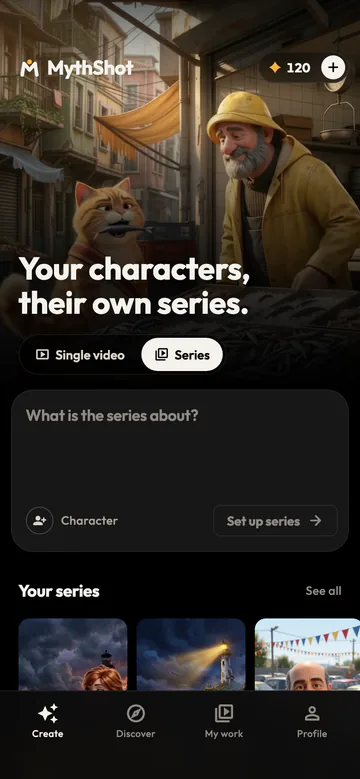
Create a series 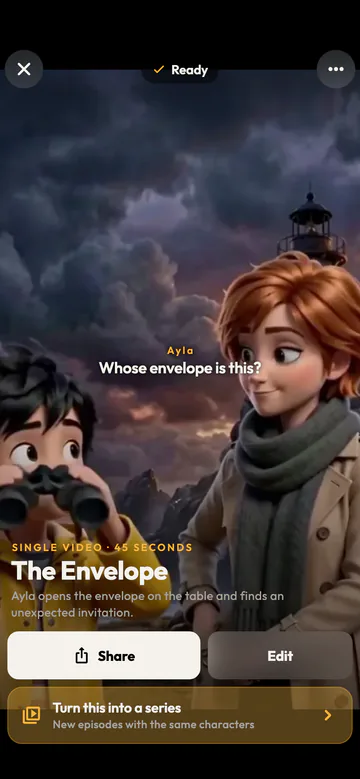
Your video is ready 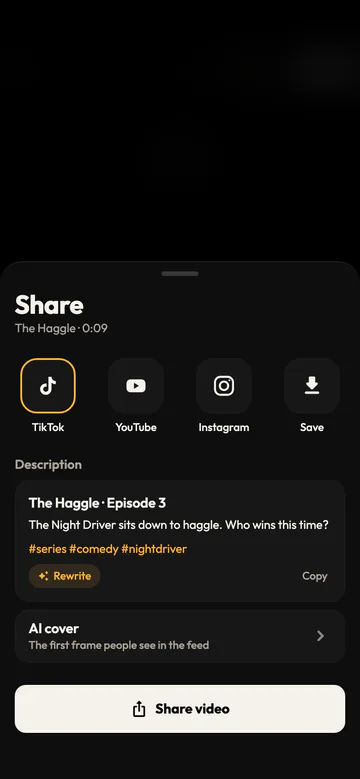
Share


| Piece | Tool in MythShot |
|---|---|
| Logo and tagline | Brand mode: logo in scenes, brand card in the corner and at the end |
| App screens | Photo as scene, Image |
| Feature names | Text, Card |
| Narration | Voice-over (your voice) or a narrated format |
| Music and effects | Music library, sound effects |
| Post copy | Suggested title, caption and hashtags for TikTok, YouTube and Instagram |
A separate motion graphics mode with charts and kinetic type is coming soon; today, promos are made with animated scenes, real screenshots and cards.
Questions
Something else? Write to us
Will my logo look exactly right?
The logo inside scenes is placed by AI and may not be exact. Your original uploaded logo is shown in the corner and at the end of every episode.
Can I make an ad for someone else's brand?
Only for brands you have the right to use; your confirmation is logged with date and time. Using another company's brand, logo or product without permission is not allowed.
Who is responsible for ad rules?
Under the terms of use, you're responsible for the commercial use of branded content and for rules such as labeling it as an ad.
Will my video have a watermark?
Videos made with gift coins carry a MythShot watermark and end card. Once you buy a coin pack, the videos you make have no watermark.
Is it free, and what does it cost?
Your first video is on us: a new account gets enough coins for a first narrated video. Talking, fully animated scenes cost more coins; every video's cost is shown before you make it. After that you buy one-time coin packs; there are no recurring charges and coins never expire. If a render fails, the coins are refunded automatically. Charges and refunds happen only on our servers and are logged.
Related guides
- AI explainer videoAnimated explainer videos that answer one question in about a minute: the Explained in a Minute, Notebook Lesson and Rapid-Fire Facts formats.
- AI cartoon makerTurn a selfie or a description into a cartoon character and make lip-synced animated episodes where every character speaks in its own voice.
- Text to video AIType one line and get a narrated, subtitled vertical video for Reels, Shorts and TikTok. How text to video works in MythShot, step by step.
- Coin packsThree coin packs priced by video time, a first video on us, video costs, refunds and bonus coin rules.
The next video is yours.
Get MythShot on the App Store and make your first video with gift coins.
Download on the App Store